Every teacher knows their students are wired differently: the ones who need to lead, the ones who need to feel safe before they'll speak, the ones who need every detail before they'll commit. What most classrooms lack is a way to actually see those differences. That's what the observer dashboard is built to do.
Your whole class on one screen
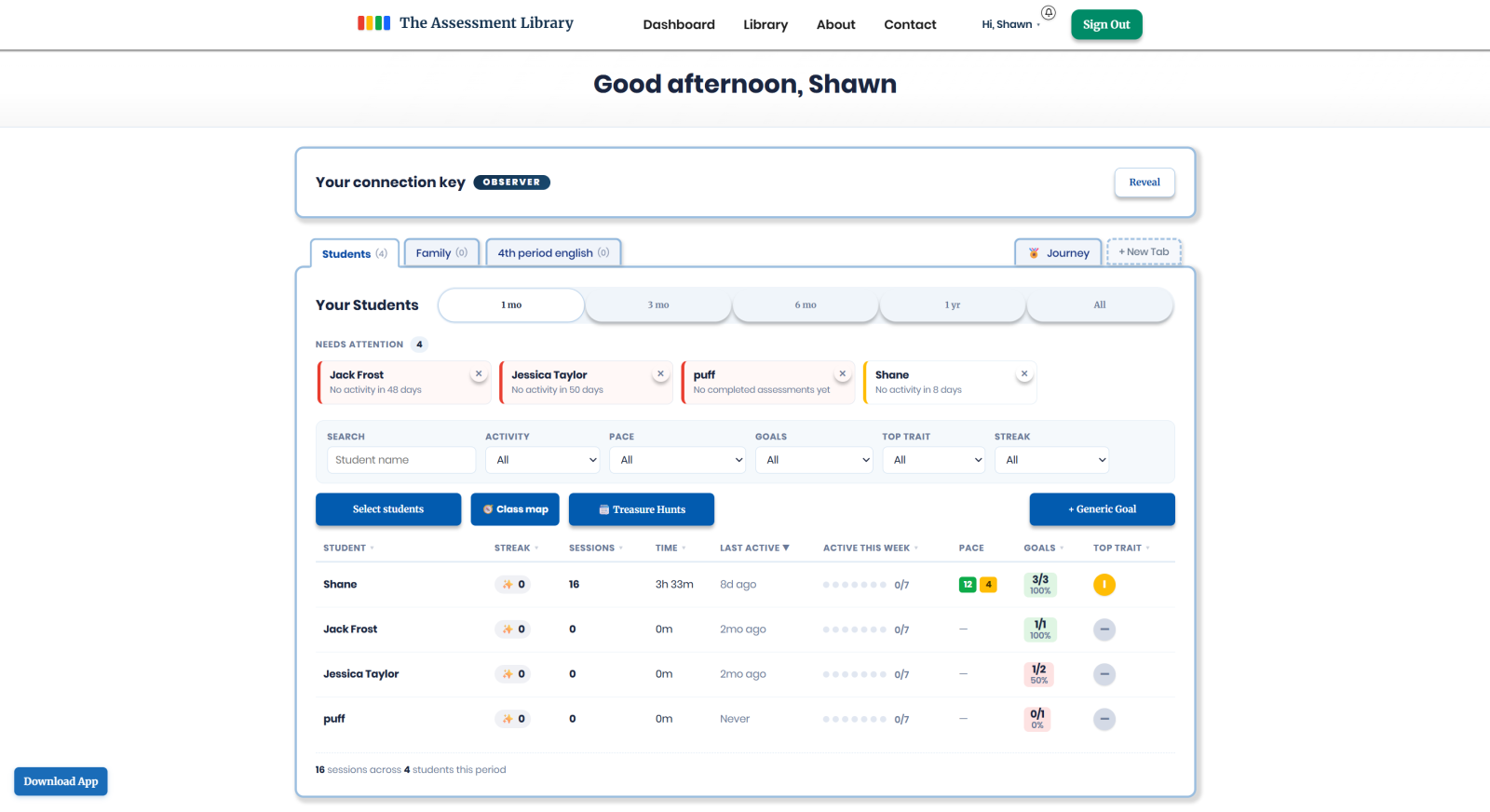
Once your students take a story-based DISC assessment, the educator dashboard turns the whole class into a single, calm view. Group students into class tabs ("4th Period English," "Homeroom"), and for each student see their streak, sessions, time spent, pace, and growing DISC profile at a glance. A "Needs Attention" strip gently flags anyone who has gone quiet, so the students who tend to slip through the cracks don't.
There's no grading and no red pen. It's a picture of engagement and personality, not performance.
Understand how each student learns
Behind every row is a real read on how that child operates. Each student's dominant DISC trait comes with plain-language "how to work with them" guidance, how they prefer feedback, what motivates them, where they'll need a nudge. It's the kind of insight that usually takes half a school year to build by instinct, available in your first week.
See how the class fits together: the DISC Map
Individual insight is powerful; seeing the group is transformative. The Class Map turns everyone's results into one shared picture: who's most alike, who naturally balances whom, and ready-to-use classroom activity ideas tailored to your specific mix of students. There's even a "How well do you know your students?" read-out, take a story as you think a student would answer, then see how close you got.
Build better groups in seconds
Group work usually runs on guesswork. From the Class Map, Organize Teams lets you arrange students on a top-down view of your actual room. Auto-build teams of similar styles, balanced mixes with a bit of every style, or stretch teams that pair very different students for growth, then drag students and tables to match reality. Each table gets a one-tap tips panel that reads its DISC mix, suggests roles (leader, presenter, supporter, organizer), and flags a lopsided group. When you're set, print it as a clean handout or save a PDF.
Goals and nudges, not grades
Set a goal for a student, with a real-world prize or bonus story tokens, and get notified when they hit it. Leave private notes, send an encouraging nudge that pops up on the child's own dashboard, compare students side by side, and assign a book to one student or the whole class in a couple of taps. You can even print a polished one-page profile for any single student to bring to a conference.
Private, safe, and simple to start
The whole dashboard is read-only and private, and it only ever begins when a family shares their connection key, so students and parents stay in control. For you, setup takes a few minutes: create an educator account, share your key, and connect your first student.
See the educator tools in detail, or follow the Get Started guide for educators. If you'd like to see it on your own roster first, you can request a demo anytime.